Compare bracket-based strategies
Set federal-bracket conversion strategies beside a no-conversion baseline to see the lifetime trade-offs.
Roth conversion planning
Explore when moving pre-tax retirement savings into Roth could change the plan. Compare conversion strategies across the whole forecast.
See what’s possible
Compare the tax paid during conversion with the effect on later withdrawals, ending assets, and projected legacy.
Read the detailed guideSet federal-bracket conversion strategies beside a no-conversion baseline to see the lifetime trade-offs.
Consider annual conversion limits and income constraints related to Medicare, ACA subsidies, and capital gains.
Review the proposed conversions year by year, then apply a selected schedule to the plan.
Explore the details
Conversion room depends on more than a target bracket. Earnings, investment income, and other sources already occupy part of the year’s tax picture. The source breakdown helps you understand that starting point before adding conversion income and comparing the resulting cost across different years.
From a question to a clearer picture
Roth planning compares how moving pre-tax money changes the projection, including the tax cost and later account balances.
Start with eligible pre-tax balances and realistic income and retirement assumptions. In Step 1 of Tax Planning, review the annual cap and any relevant capital-gains, investment-tax, Medicare, or marketplace-coverage guardrails. The same selected boundaries apply across the comparison columns.
Let the comparison finish, then select a target column. Read the conversion amount, timing, modeled cost, and lifetime effects beside the no-conversion baseline. Continue to the conversion charts and expandable annual schedule to understand when money moves and what limits each year.
Apply to plan carries the selected schedule into the projection, cash flow, estate, and reports. Review those effects together. Step 2 can then account for the income room consumed by applied Roth conversions when it models gain harvesting.
Connect the whole plan
Moving money to Roth changes where future balances sit and can alter the pattern of later pre-tax distributions. The withdrawal chart provides the longer view behind that decision. Compare the converted plan with its baseline, then examine the tax and after-tax wealth outcomes alongside the changing sources.
One way to use it · illustrative scenario
Imagine a household with pre-tax retirement savings and lower earned income in its first retired years. It wants to compare possible conversion schedules.
Try an example planHold the household assumptions and guardrails fixed, then compare a lower federal-bracket target with a higher target.
Look at the years used, the total converted, and the cost of converting. Then compare ending after-tax wealth and the estimated rate on later pre-tax withdrawals.
Converting more is not the same as improving the result. The comparison shows the timing and tax trade-offs under this household's modeled assumptions.
Make sense of what you see
The comparison identifies the no-conversion baseline and shows how each target changes key outcomes. Read the row label before comparing figures: an ending balance, a difference from baseline, and a conversion tax cost describe different quantities.
In bracket mode, the column names a federal ordinary-income target. The cost row captures the modeled effect of the conversion, which can include other interactions. Compare that cost with later withdrawal assumptions instead of treating the column label as an all-in rate.
The annual view shows conversion timing and the limits that stopped a year. Small or absent conversions can reflect income already filling the available room, a cap, another guardrail, or a lack of pre-tax money remaining to move.
A little more detail
The columns become ceilings on the modeled average tax cost per converted dollar, instead of federal-bracket targets. Other guardrails and the annual cap still apply. Lower-rate first is inactive in this mode because it is defined around bracket opportunities.
The plan may lack eligible pre-tax accounts, run out of pre-tax money before the relevant years, or have no conversion room under the selected limits. Read the empty-state explanation and annual constraints before changing assumptions.
Selecting a column previews it. Apply to plan saves it; continuing to Step 2 can also apply an explicit choice, or the displayed recommendation when no schedule is saved. Current results and an editable plan are required. Check the Roth status when you enter gain harvesting.
Keep exploring
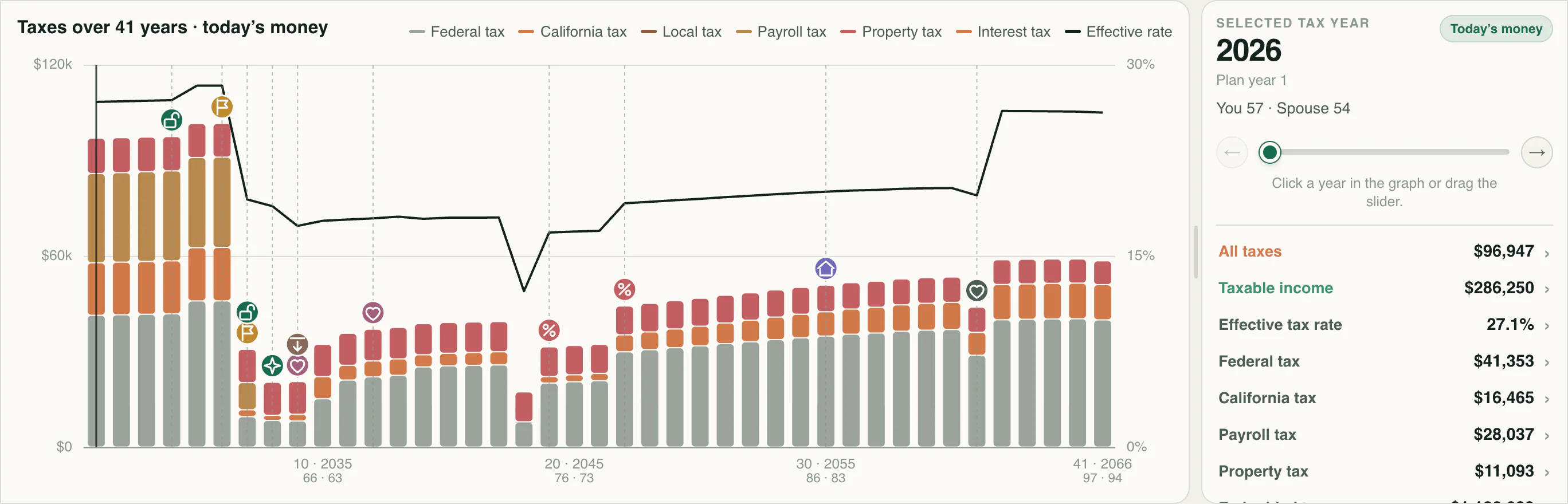
Explore estimated lifetime taxes and inspect the income, rates, and deductions behind each year.
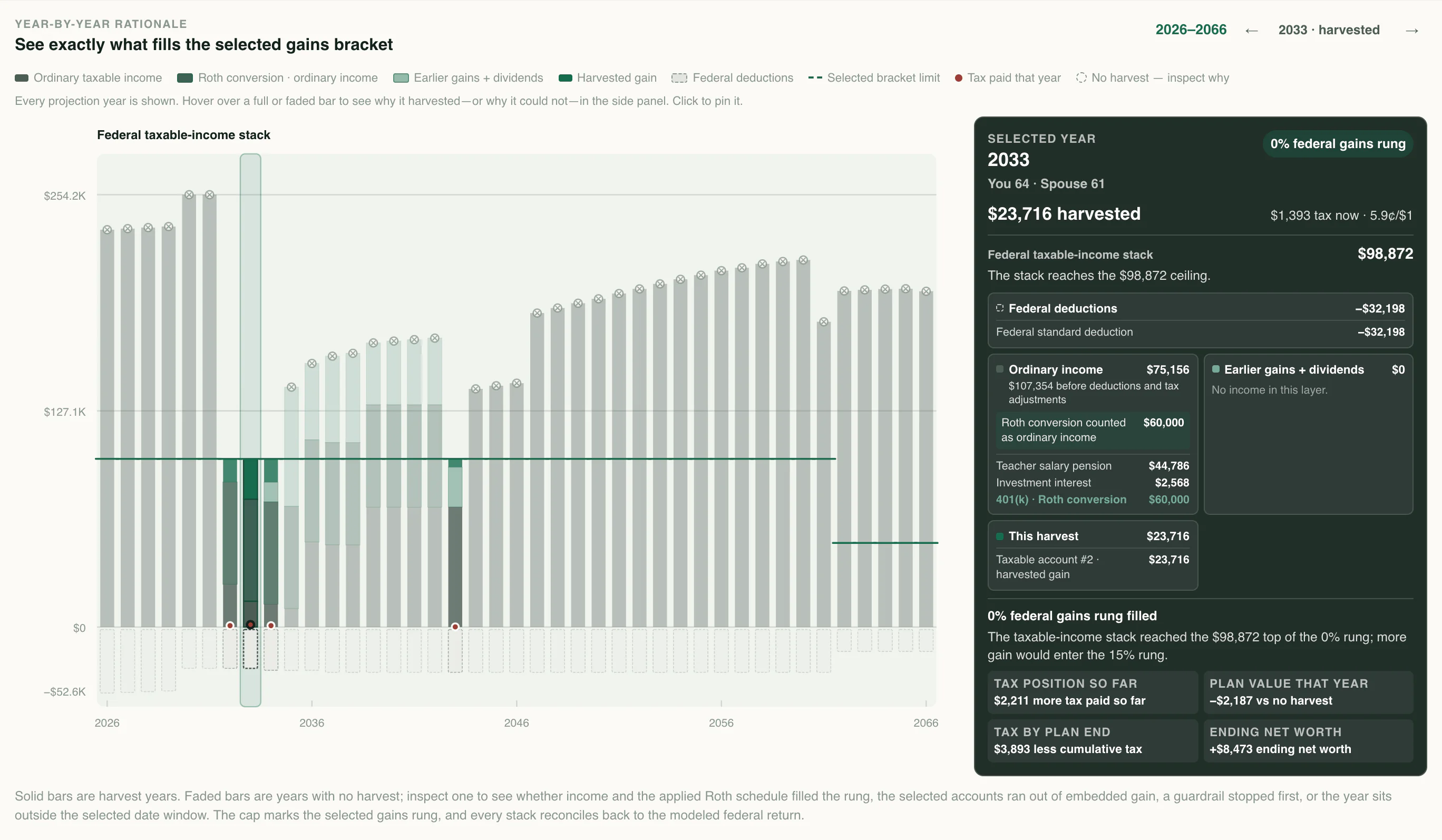
Explore realizing gains in lower-rate years, raising cost basis, and coordinating the strategy with Roth conversions.
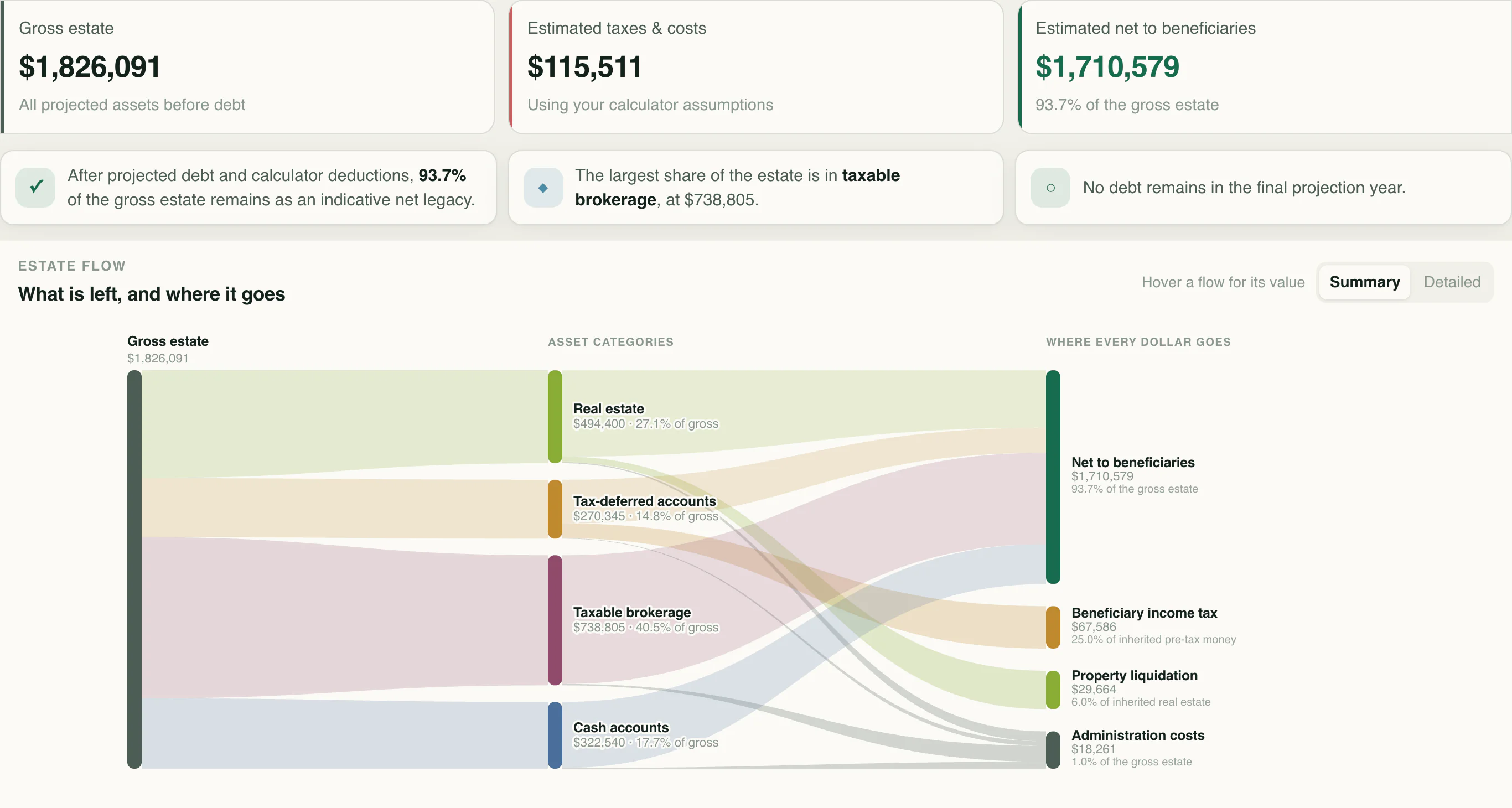
Follow projected assets through debts, estimated taxes, and estate costs to the legacy left behind.
Know the language
Your next chapter
Start with your numbers. See where they could lead.