Understand what makes up the estate
See the property, cash, and investment accounts the projection holds in its final year.
Estate planning
See how the assets at the end of your plan translate into a modeled legacy, after debt, estimated taxes, and the costs of settling an estate.
See what’s possible
Explore the composition of the estate and see how different cost assumptions change the amount left behind.
Read the detailed guideSee the property, cash, and investment accounts the projection holds in its final year.
Use the estate flow to see how debt, taxes, property liquidation, and administration affect the result.
Adjust estate-cost scenarios and see how the modeled net legacy changes.
Explore the details
Cash, taxable investments, and retirement accounts can contribute differently to the modeled estate after taxes and costs. Start by seeing how the account mix develops over the plan. Then use the estate view to follow the final year’s holdings through the modeled deductions and settlement costs.
From a question to a clearer picture
The estate view starts with the projection's final year and shows how modeled debts, taxes, and costs affect what remains.
Check the end-of-plan year and choose today's purchasing power or future dollars. Review the property, cash, and investment balances arriving from the projection. This establishes which assets the estate estimate is working with before you explore the assumptions about how they pass.
Use the calculator to vary the assumed tax on inherited pre-tax accounts, property selling costs, charitable giving, and administration costs. Review the basis treatment, federal assumptions, and selected state. Change one assumption at a time when you want to understand its contribution.
Read the flow and calculator together. Switch between Summary and Detailed views to move from asset categories to individual assets. Inspect where the value goes, then compare gross estate with the modeled net amount reaching beneficiaries under the selected assumptions.
Connect the whole plan
The value left behind depends on what is owed as well as what is owned. Debt can decline or end well before the plan’s final year. Reading the mortgage and loan path alongside the estate calculation helps explain why the net amount can change even when gross assets look similar.
One way to use it · illustrative scenario
Imagine a household whose final projection includes a home, retirement accounts, and taxable investments. It wants to understand the sensitivity of its estate estimate to selling property.
Try an example planKeep the projected holdings fixed and try a different hypothetical property-liquidation cost in the estate calculator.
Follow the real-estate flow into the liquidation-cost destination, then check the calculator's cost total and net-to-beneficiaries result. Review the asset detail to keep that change separate from the treatment of retirement accounts.
This isolates an assumption about settling the estate. It does not change the property's projected market value or arrange a sale.
Make sense of what you see
The left side shows the projected gross estate. The middle separates that value by asset category or individual holding. Those categories can have different modeled costs, so equal headline balances need not produce equal amounts for beneficiaries.
The right side names the deductions included in the estimate, such as debt, beneficiary income tax, administration, or property liquidation. Hover a flow for its value. Destinations reflect the assets and assumptions in this scenario; not every category appears in every plan.
Read gross estate minus debt, taxes, and costs alongside estimated net. The percentage of gross remaining makes the scale easier to compare, while the Detailed view helps locate which holdings account for the largest modeled deductions.
A little more detail
These controls are scenario inputs held in the estate view, rather than saved plan facts. They let you explore sensitivity to costs and tax assumptions. Use Reset to return to the calculator's starting assumptions.
The calculator applies its capital-gains assumption only when step-up is off, using the entered embedded-gain share. This is a simplified way to compare basis-treatment scenarios; it does not determine the legal treatment of each inherited holding.
No. The estimate does not infer trusts, portability, prior gifts, inheritance taxes, special deductions, or individual beneficiary circumstances. The selected state and other calculator inputs describe a modeled settlement scenario, not legal documents or an estate-tax return.
Keep exploring
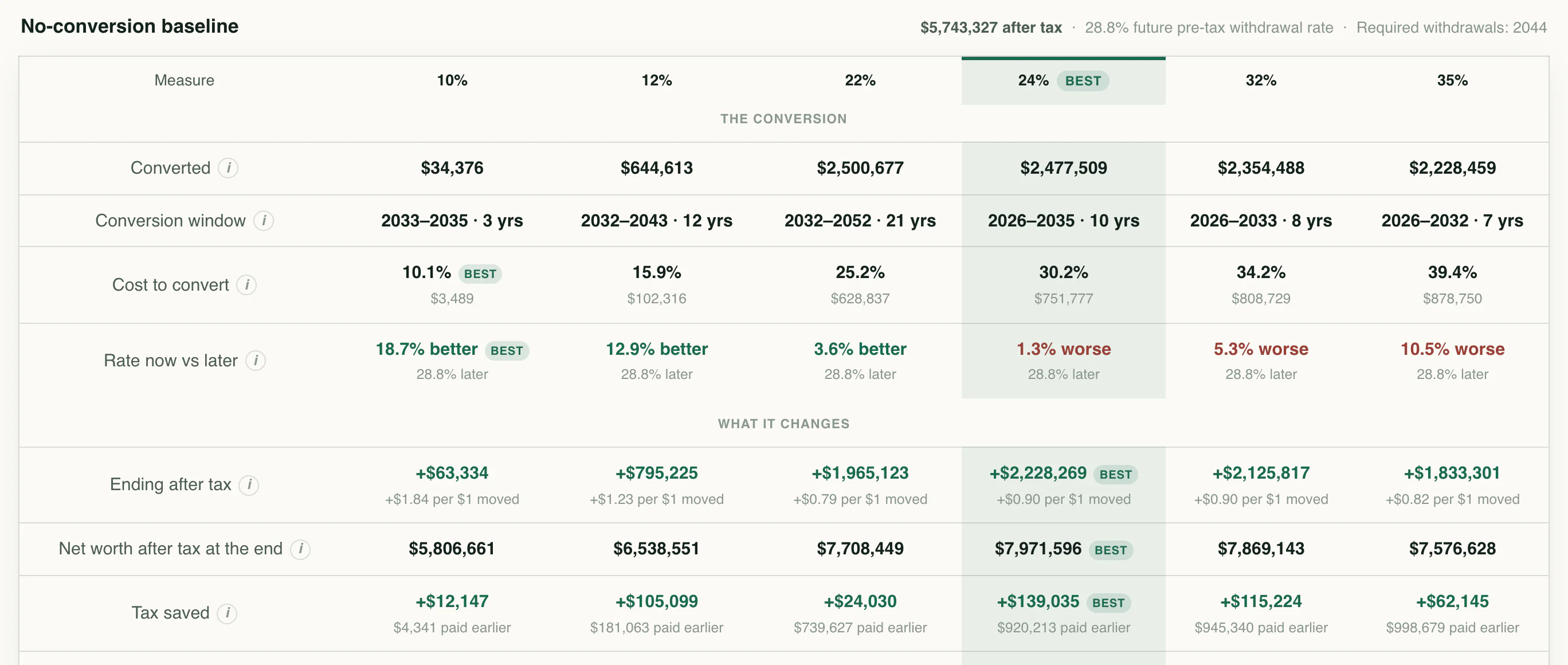
Compare conversion strategies and see the trade-offs between taxes today, later withdrawals, and ending wealth.
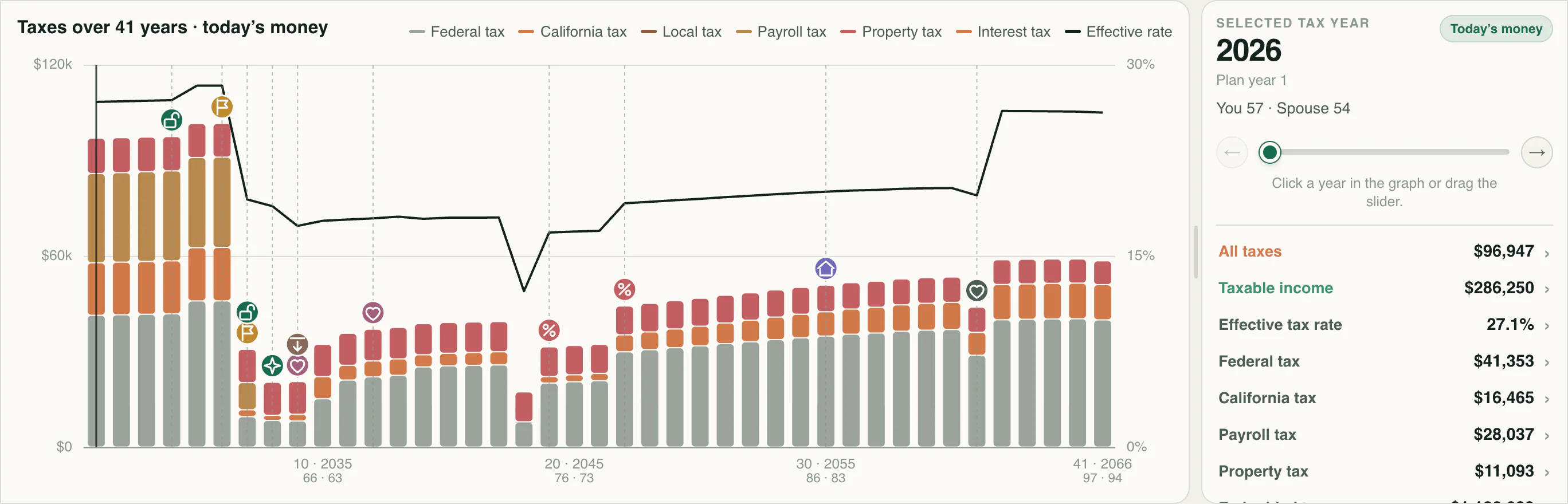
Explore estimated lifetime taxes and inspect the income, rates, and deductions behind each year.
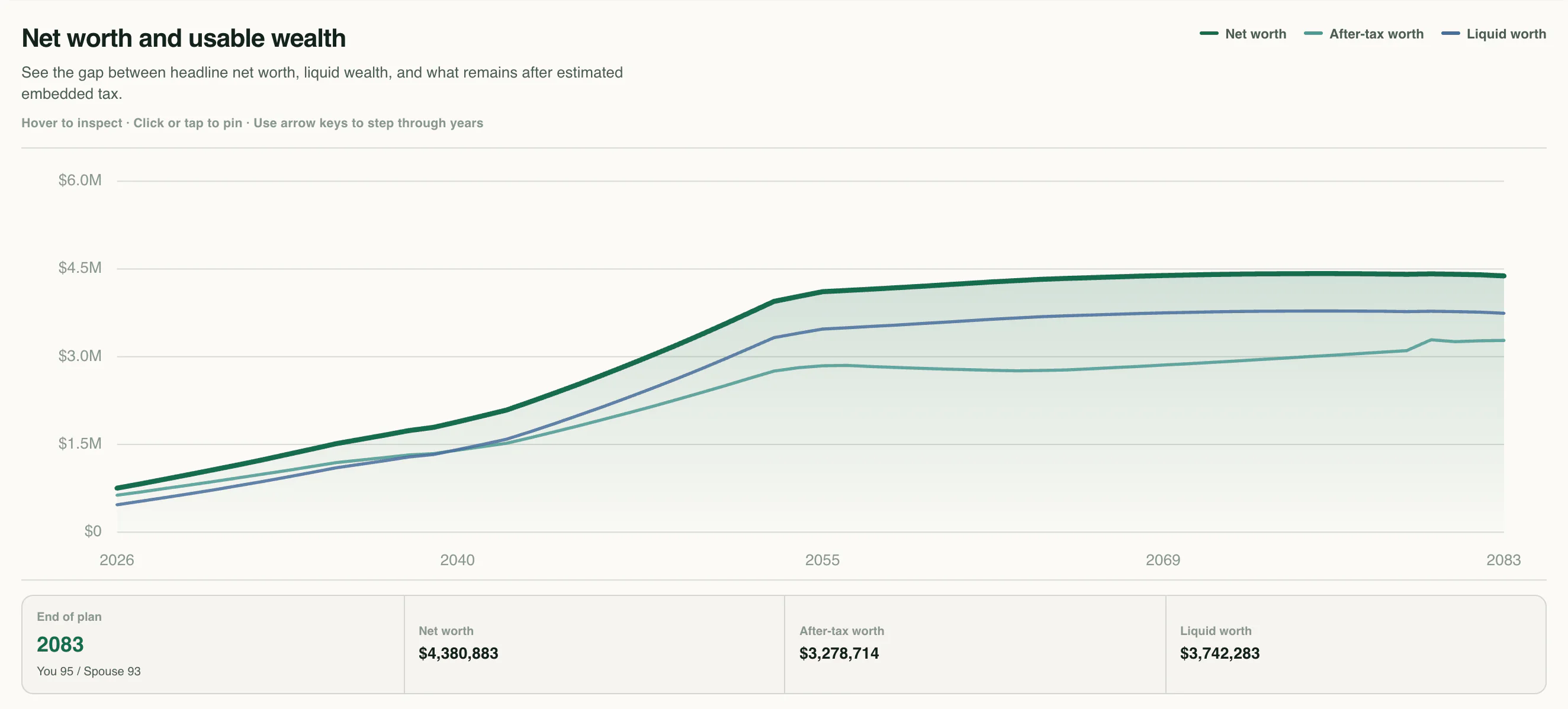
Review your financial plan in a readable report and export detailed annual projection and tax tables to explore the numbers behind your forecast.
Know the language
Your next chapter
Start with your numbers. See where they could lead.